jobhop / quietledger

Your job search,
in one place.

jobhop looks through job postings for you, keeps track of every application, and prepares each one — the form answers, the cover letter, all of it. Then it stops, and lets you send it.

Get started See the project
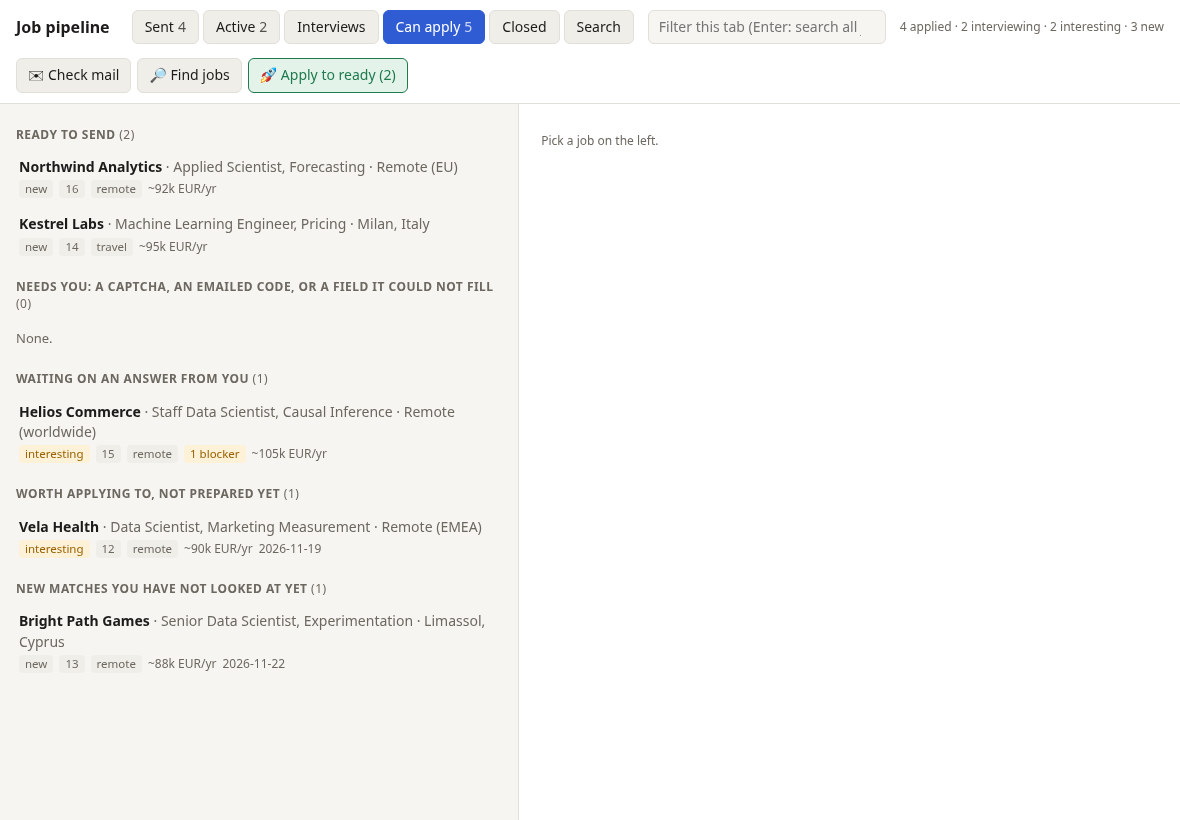
The jobhop board: applications waiting, in progress and interviews, with one job open showing its notes and next steps.

Everything about your search on one screen — where each application stands, what still needs you, and what is ready to send.

How it works

Four steps, and you are in control of the last one.

  1. Tell it what you are looking for

    Your job titles, where you want to work, and what you would like to earn. A few questions when you first open it — no account, no sign-up.

  2. It finds postings for you

    jobhop checks job boards and company career pages, and keeps the ones that actually match what you asked for. No more scrolling through listings that were never for you.

    Point it at a feed it does not know — your city's board, an export from another tool, a company's own page — and jobhop import takes it, even when the columns are named differently. It also speaks the two formats other tools use: job.json and schema.org JobPosting.

  3. It prepares each application

    For the ones worth applying to, it fills in the form, writes the answers, and adds a cover letter when one is asked for. You can read and change anything.

    It reads the real form where the employer's system publishes one, fills what it can, marks the rest, and stops before Submit. jobhop platforms tells you which systems it handles and how well — including the ones it deliberately does not touch.

  4. You send it

    Nothing goes out on its own. You open the application, check it, and click send. jobhop never applies on your behalf without you.

What it keeps off your plate

The parts of a job search that are pure admin.

Remembering what you sent

Every application, with its status and its date, in one list. You will not apply to the same company twice, or forget who never replied.

Writing the same answers

Your notice period, your salary expectations, your location — filled in once, reused on every form that asks.

Chasing the silence

When a reply is overdue, jobhop puts it in front of you, so a good lead does not quietly go cold.

Tailoring the CV

It keeps your CV up to date and ready to attach, so you are not editing a document at midnight for one more application.

Nothing leaves your computer

No account, no subscription, no server holding your data.

Why it is not a website. A hosted version would need your CV, your mailbox and your applications on someone's server, and that is the one thing this is built to avoid. So it stays on your machine. If you want it on a server of your own, that is a different conversation — and it would be your server, not ours.

Guide

Three steps, and it is running.

  1. Download it

    Pick the file for your computer below. On Linux you have to allow it to run first; on Windows you will get one warning. Both are explained underneath.

  2. Answer a few questions

    It opens in your browser and asks who you are, what you are looking for, your salary bar, and for your CV — the things a job application form will ask anyway. It writes them down for you, in a folder you can look at and edit.

  3. Work from the board

    Find postings, read what it has drafted, and send the ones you like. It prepares the form, the answers and the cover letter; you click send. That is not a setting — it is the only way it submits anything.

Getting it

jobhop runs on your own computer. Download it, run it, and it asks you a few questions the first time. No account, no sign-up, nothing to configure.

Or, if you have Python and would rather not download an executable, one line fetches and runs the same thing:

pip install jobhop && jobhop ui uvx --from git+https://codeberg.org/quietledger/jobhop jobhop ui

It is on PyPI too — the same thing, if you already live in a terminal: pip install jobhop · pypi.org/project/jobhop

Everything is checked with SHA256SUMS — sha256sum -c SHA256SUMS. What changed in this version, and what was verified before it was published, is in the release notes.

Not sure yet? Try the search right here, in your browser — it looks at four public job boards, scores them against what you type, and keeps nothing:

demo.vinci128.org

It hands you the results as a file you can feed straight into your own copy. It is not a hosted jobhop: no account, no mailbox, no CV — those only work on your machine, which is the point.

Or see the board first, with fictional data and nothing of yours touched — that is a throwaway tracker, not the search:

uvx --from git+https://codeberg.org/quietledger/jobhop jobhop demo
How do I actually run it?

Windows: double-click the file. If SmartScreen appears, click More info and then Run anyway — it is not code-signed, and that is the whole meaning of the warning. A small black window opens and your browser comes up with jobhop in it.

Linux: the file has to be allowed to run first, because it arrived from the internet. In your file manager, right-click it → Properties → Permissions → tick Is executable, then open it. From a terminal it is chmod +x jobhop-0.1.1-x86_64.AppImage once.

Either way the page that opens in your browser is jobhop itself. Leave the little window open while you use it; close it when you are done.

I ran it and nothing happened.

Two things to check. If a browser tab did not open, go to http://127.0.0.1:8770 yourself — the program may have said nothing and worked anyway. If that address is already in use, it moves to the next free port and says which one it used in the small window. And on Linux, a file that is not executable does nothing at all when opened — see the question above.

I ran it. Now what?

It asks you a few questions in your browser the first time — your name, what you are looking for, your salary bar, your CV — and writes them down for you. From then on it is the real thing, with your own data, kept on your machine.

Do I need to install Python?

No. The uvx command fetches its own Python and runs jobhop in a temporary environment. If you would rather keep it installed, uv tool install git+https://codeberg.org/quietledger/jobhop gives you a plain jobhop command, and pip and pipx work too.

Does it work on Windows?

Yes — there is an .exe above, and it needs nothing installed. Everything except the unattended daily routine works on Windows, Linux and macOS; the routine is a shell script that drives an agent CLI, so it needs a shell.

Where does it keep my data?

In a folder called jobhop in your home directory, created the first time you run it: your profile, the tracker, the drafts, the CV. It is a normal folder you can look at, back up or delete.

Is it really free?

Yes, and it is open source under the MIT licence — you can read it, change it and share it. There is no paid version, no account, and no telemetry.

What if I am not comfortable with technical things?

Download the file for your computer above, run it, and everything after that happens in your browser like any other app. The questions it asks are in plain language.
Support

jobhop is free and open source under the MIT licence. No account, no telemetry, no paid tier.

If it saved you some time, you can buy me a coffee. It goes towards the things the project actually costs: a code-signing certificate — the one that would remove that Windows warning — and the time to repair the fetchers when a job board changes its mind about its HTML.

☕ Support jobhop on Ko-fi